Home | Products | Services | Support   About | Buy
Site Search

 
Payrolls supported
Payroll Timesheet Systems

NEXT STEPS
Timesheet Software See Product Tour
Timesheet Software Learn/Features
Timesheet Software Try
Timesheet Software Live Demos
Timesheet Software Webinars
Timesheet Software Buy
home > products and services > enterprise time tracking
How much money can IVR Phone Timesheet save you?
For offline employees, paper timesheets filled out at the end of the day are costing you money. Inaccurate attendance, lost timesheets, faxed timesheets and busy signals mean overpaying overtime, redoing payrolls and slow billing.
Supervisors, stretched thin already, need access to attendance information real time to plan and updates schedules. Employees need a quick and easier way to check in at remote work sites.
For employees who either do not have access to online systems or browsers, or can not easily be trained to do so, IVR Phone Timesheets are the only solution to automating the capture and reporting of their attendance.
Pacific Timesheet IVR Phone Timesheet Software
Pacific Timesheet IVR Phone Timesheet systems capture the location and time of all employees calling in. Accurate check in and out times will save you thousands in more accurate tracking of overtime and other exception time hours. Real time capture and storage of employee hours means no double data entry for payroll, far fewer errors and faster billing.
Pacific Timesheet IVR Phone Timesheet systems are a supervisor tool to handling employee absences immediately when if might affect a customer site adversely. Accurate attendance can be used to better manage and identify employee lateness.
Pacific IVR Phone Timesheet systems reduce the time and cost of employees submitting their time and supervisors tracking and approvals their hours by more than 75%.

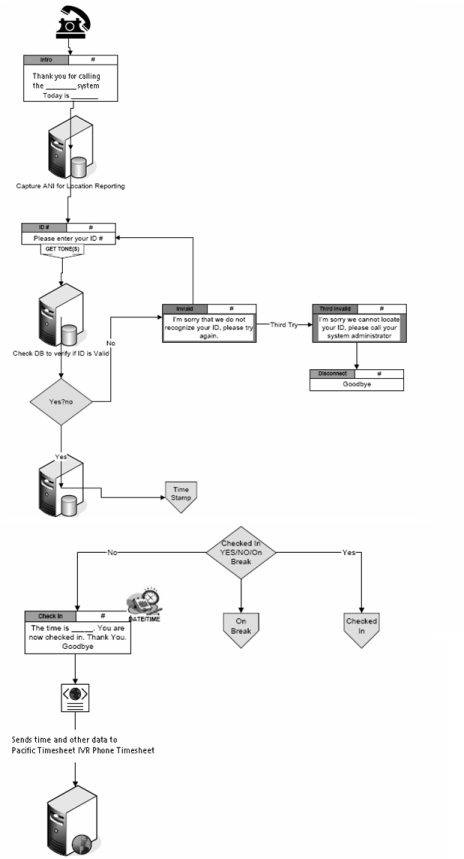
IVR Phone Timesheet Software : How It Works

ivr phone timesheet callflow diagram

  1. Employees call into Pacific Timesheet IVR Phone Timesheet system using an 800 number.
  2. Caller ID can be captured to authenticate employee location for reporting.
  3. Employee enters and system validates employee ID.
  4. Error handling prompts employee to re-enter ID. If second attempt fails he or she is prompted to contact their supervisor or system administrator.
  5. If ID is correct, system clocks in employee as checked in or checked out from a previous punch


Construction Timesheets | R&D Technical Timesheets | Manufacturing Timesheets | Project Timesheets | Payroll Timesheets
Job Costing | Custom Reporting | Time Off | Time and Attendance | Time Tracking | Project Management
Enterprise Timesheets | Web Timesheet Software | Integration Web Services | Product Applications | Timesheet Interfaces
Online ASP Services | Consulting Services | Training Services | Operating System Support | Technical Support

Privacy | Email Pacific Timesheet | © 2008 Pacific Timesheet. All Rights Reserved