Project Time and Expense Tracking Product Tour

 Track project time, expenses, labor costs, and work activity in one flexible system.

A guided walkthrough for project and program management teams 

  
Section 1

Overview

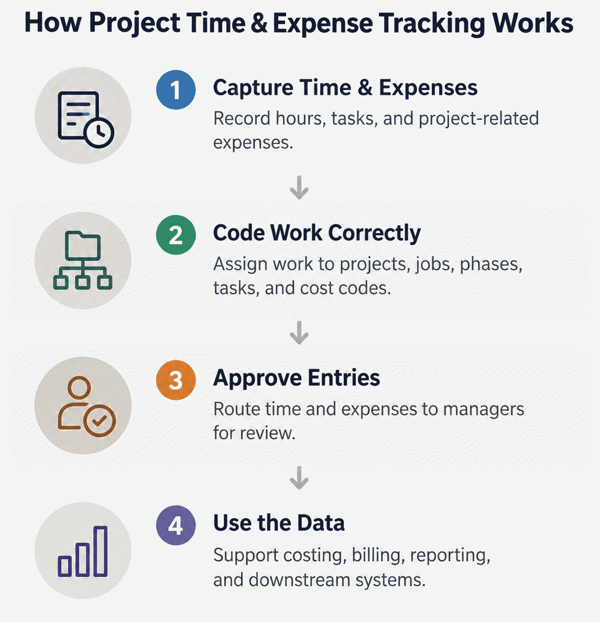
Pacific Timesheet helps project-based organizations capture employee time and expenses, organize work around customers, projects, jobs, phases, tasks, cost codes, and other work structures, and turn that activity into accurate project labor and cost data.

Employees get simple time and expense entry, while project managers and finance teams gain timely visibility into project activity, costs, approvals, reporting, and downstream accounting or payroll data.


how-project-time-and-expense-tracking-works-2-1

  
Section 2

Build project structures around the way your organization works

Every organization organizes project work differently.
Pacific Timesheet lets you create project structures that reflect your actual business rather than forcing your teams into a fixed hierarchy.

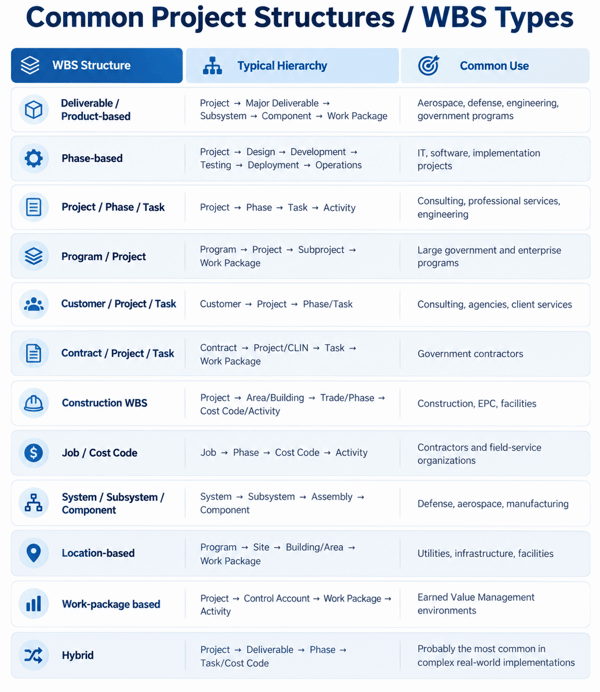
Support virtually any project or work breakdown structure

Configure Pacific Timesheet around the way your organization manages work — including customers, programs, contracts, projects, jobs, phases, tasks, work packages, cost codes, activities, locations, and other WBS elements.

Pacific Timesheet has served project-oriented customers in diverse industries from aerospace, semiconductors, pharma R&D to mining equipment and construction: 

examples-of-project-oriented-customers-2-1


common-project-structures-wbs-2

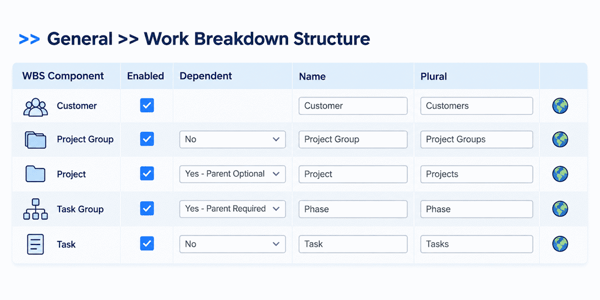
Flexible WBS Configuration Tools

  • Multiple WBS levels
    Configure layered project structures to match how your organization manages work.
  • Custom names for every level
    Rename WBS levels as Customer, Project, Phase, Task, Job, Cost Code, Work Package, Activity, or other terms.
  • Multi-language terminology
    Define WBS names in multiple languages for users in different regions or locations.
  • Parent-child dependencies
    Control which WBS levels depend on others to guide valid selections and improve coding accuracy.

pacific-timesheet-wbs-structure-tool-2

    
Section 3

Give employees fast, accurate project time and expense entry

Project time and expense tracking works best when employees can quickly record the work they performed without navigating through unnecessary choices. Pacific Timesheet provides streamlined time and expense entry for employees working across multiple projects, jobs, or tasks.

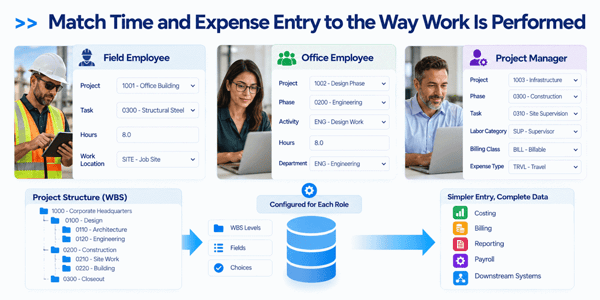
Match Time and Expense Entry to the Way Work Is Performed

Pacific Timesheet lets you configure time and expense entry for different types of employees and project work. Present the WBS levels, fields, and choices each user needs while hiding unnecessary complexity. Employees get a simpler entry experience, while the organization still captures the detailed project data required for costing, billing, reporting, and downstream systems.

match-time-and-expense-entry-to-the-way-work-is-performed-2

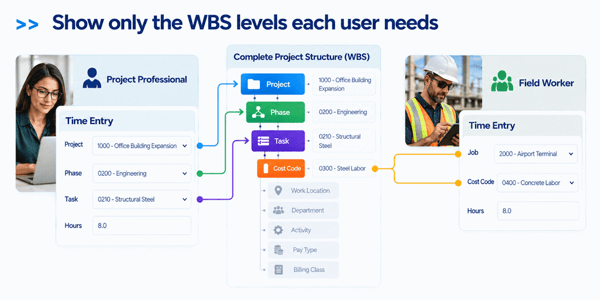
Show only the WBS levels each user needs

One employee might enter Project → Phase → Task, while another only selects Job → Cost Code. The system can simplify the visible structure without changing the underlying project data model.

show-only-wbs-levels-each-user-needs-2

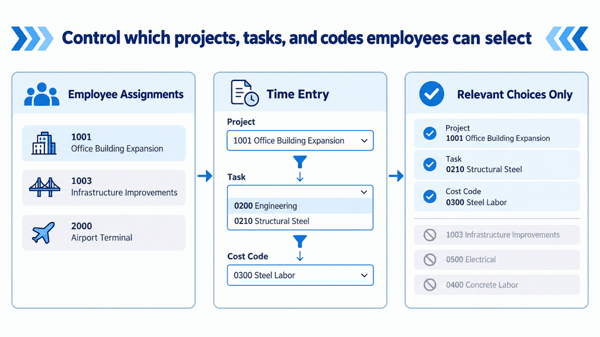
Control which projects, tasks, and codes employees can select

Demonstrate assignments and dependent selections so employees see relevant choices instead of searching through every project or task in the system.

control-which-projects-employees-can-select-2

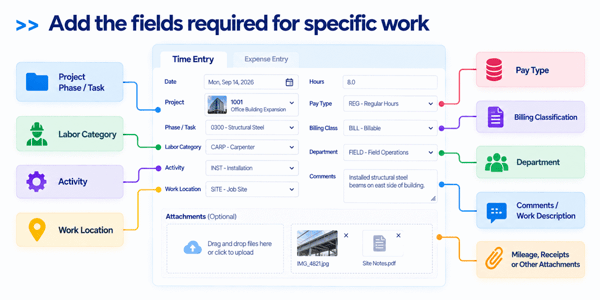
Add the fields required for specific work

Show that time or expense entry can include things such as labor category, activity, location, pay type, billing classification, notes, mileage, receipts, or custom fields when needed.

 

add-the-fields-required-for-specific-work-2


Section 4

Show employees only the projects and tasks assigned to them

Large project databases can quickly become difficult for employees to navigate.
Pacific Timesheet lets you control which projects, jobs, tasks, or other work items are available to each employee. Assignments can be used to present employees with a focused list of relevant work rather than requiring them to search through every active project in the organization.

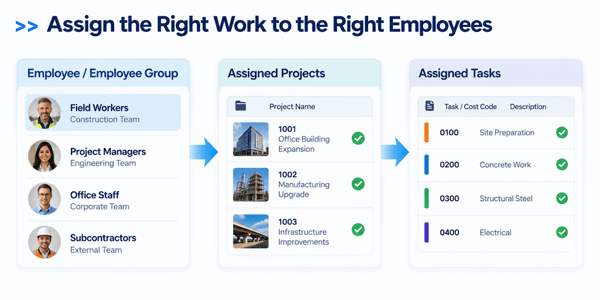
Assign the Right Work to the Right Employees

Pacific Timesheet lets administrators control which projects, jobs, tasks, cost codes, or other work items are available to each employee or employee group. This helps ensure that users see the work they are actually authorized or expected to perform, rather than the organization’s entire project database.

assign-the-right-work-to-the-right-employees-2

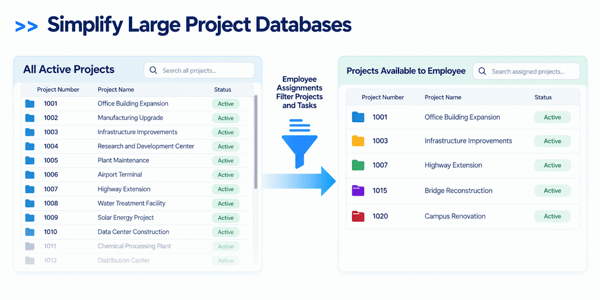
Simplify Large Project Databases

Organizations with hundreds or thousands of active projects can make time entry unnecessarily difficult if every employee must search through the same master list. Pacific Timesheet narrows those choices so employees can work from a focused set of relevant projects and tasks, making entry faster and easier.

simplify-projects-with-smart-filtering-2

Use Assignments to Improve Coding Accuracy

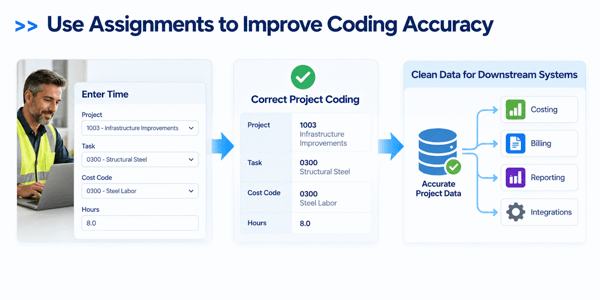
Assignments do more than simplify navigation. They also help prevent employees from charging time or expenses to the wrong project, phase, task, or cost code. By limiting selections to valid work assignments, Pacific Timesheet reduces coding errors before the data reaches approval, costing, billing, or reporting.

assignments-improve-coding-accuracy-2

Manage Assignments as Work Changes

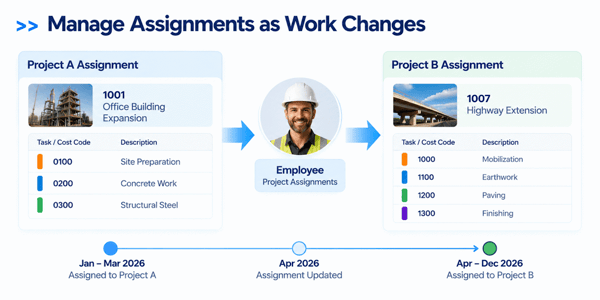
Project assignments can change as employees move between projects, phases, or teams. Pacific Timesheet can support ongoing changes to the work available to employees so their entry choices stay aligned with current assignments.

managing-project-assignments-over-time-2

    
Section 5

Capture detailed labor information with every time entry

Project hours often need more context than simply identifying the project.
Pacific Timesheet can capture additional information with each time entry so organizations can create the level of project detail required for costing, billing, reporting, compliance, or downstream systems.

Add Labor, Pay, and Billing Detail

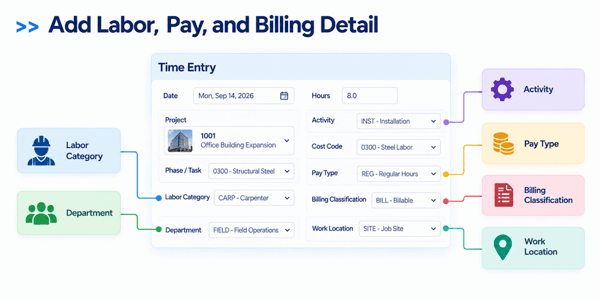
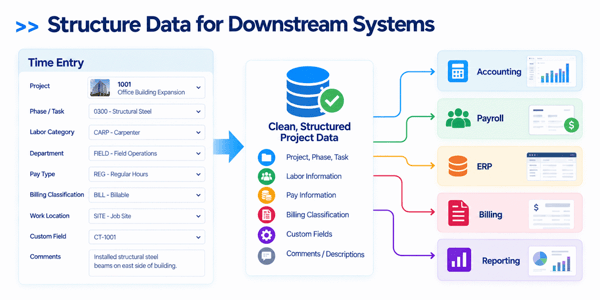
Pacific Timesheet can capture additional labor dimensions such as labor category, department, pay type, billing classification, and work location. These fields help organizations distinguish how labor should be costed, paid, billed, or reported without requiring separate manual classification later.

labor-pay-billing-details-2

Capture Custom Business Information

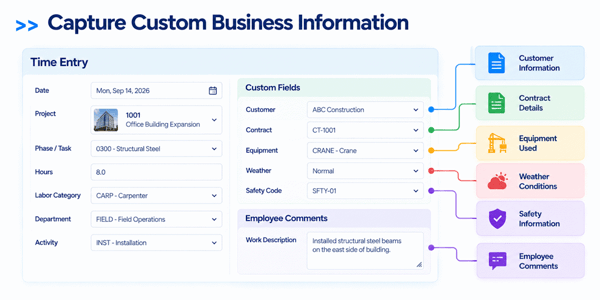
When standard fields are not enough, custom fields can be used to collect additional information specific to your organization, customer, contract, or reporting process. Employee comments and work descriptions can also provide qualitative detail about what was performed during the recorded time.

capture-custom-business-information-2

Structure Data for Downstream Systems

By capturing project, labor, pay, billing, and custom information at the time of entry, Pacific Timesheet creates cleaner data before it reaches accounting, payroll, ERP, billing, or reporting systems. Managers gain more detailed visibility into how labor is being used, while downstream processes receive information that is already coded and organized correctly.

structured-data-flow-to-downstream-systems-2


Section 6

Track project labor costs against project budgets as work happens

Move employee time and expense information through a structured approval process before payroll.

Pacific Timesheet gives organizations control over who reviews information, which approvals are required, and how exceptions are handled. 

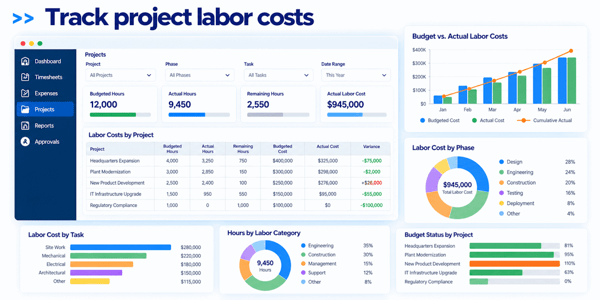
Knowing how many hours have been charged to a project is useful. Knowing what those hours cost is even more useful.
Pacific Timesheet helps organizations translate employee time into meaningful project labor-cost information. Labor data can be analyzed by:
•    Customer
•    Project
•    Job
•    Phase
•    Task
•    Activity
•    Employee
•    Labor category
•    Department
•    Cost center
•    Other configured dimensions

supervisor-review

Track project labor costs

Organizations can use project labor information to understand where labor resources are being consumed and compare actual activity with project plans, budgets, or financial targets.
This gives project managers earlier visibility into developing cost issues instead of waiting until the project is complete.

multi-level-approvals

Compare project budgets with actual labor activity

Pacific Timesheet helps organizations monitor actual labor activity against project budgets and planned work.

Managers can review information such as:
•    Budgeted hours
•    Actual hours
•    Remaining hours
•    Labor costs
•    Project activity by employee or team
•    Hours by phase or task
•    Project progress over time
Identify projects, phases, or tasks that are consuming more labor than expected.
Instead of discovering overruns after accounting closes the period, managers can use current time data to investigate problems while there is still time to respond.

flexible-approval-routing

    
Section 7

See the Full Cost of Project Work

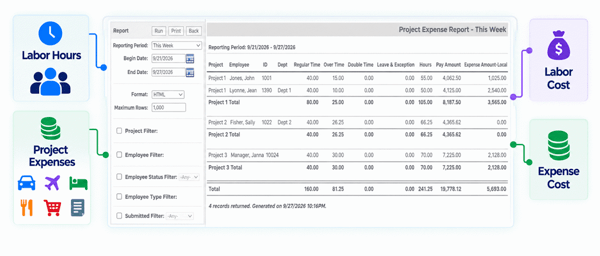
When time and expenses are managed together, project managers and finance teams can evaluate labor and non-labor costs as part of the same project picture. Instead of reviewing employee hours in one system and reimbursable or project expenses somewhere else, Pacific Timesheet helps bring those activities together around the same customer, project, job, phase, or task structure.

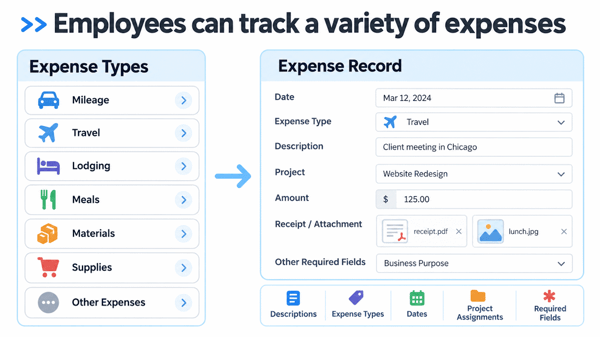
Employees can track a variety of expenses

  • Mileage
  • Travel
  • Lodging
  • Meals
  • Materials
  • Supplies
  • Other reimbursable or project-related expenses

Expense records can include supporting information such as descriptions, expense types, dates, project assignments, and other required fields.

employee-track-variety-of-expenses-2

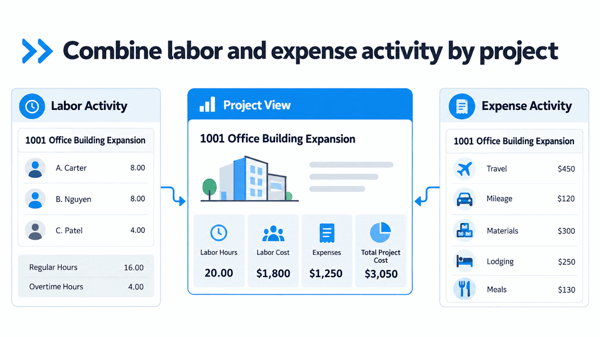
Combine labor and expense activity by project

View employee hours alongside travel, mileage, materials, lodging, meals, and other project-related expenses to understand total project activity more completely.

combine-labor-and-expense-by-project-2

Improve project cost visibility

Managers can see not only how much labor a project is consuming, but also the additional expenses associated with performing that work.

visibility-into-project-hours-and-expense-2

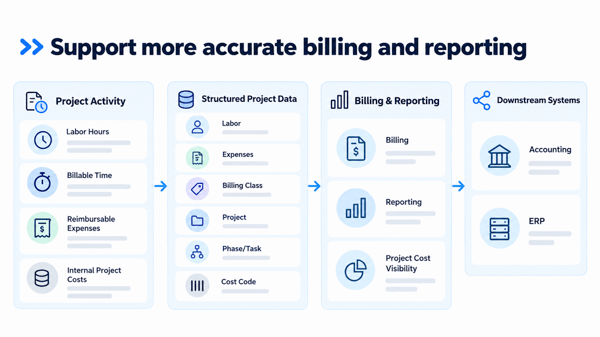
Support more accurate billing and reporting

Keeping labor and expense data together helps ensure that billable activity, reimbursable expenses, and internal project costs are captured consistently before data moves into accounting or ERP systems.

support-more-accurate-billing-workflow-2

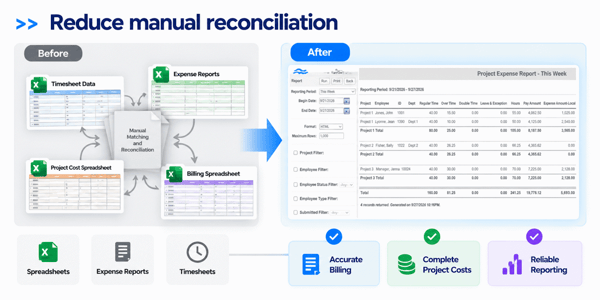
Reduce manual reconciliation

When time and expense records use the same project structure, organizations spend less effort matching separate spreadsheets, expense reports, and timesheet data after the fact.

streamlining-manual-reconciliation-2


Align Time and Expense Approvals Across Project, Program, Portfolio, and Enterprise Levels

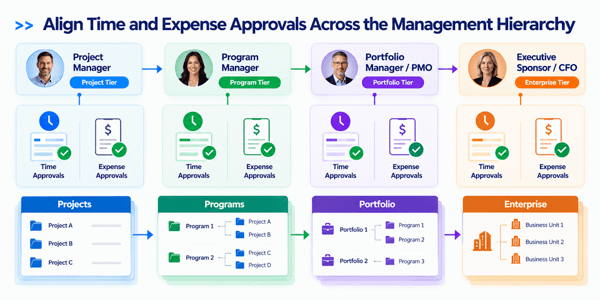
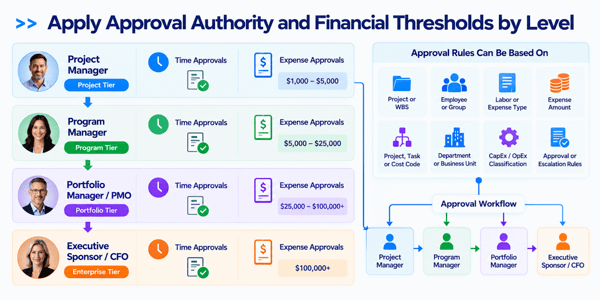
Effective project governance requires time and expense approvals to follow the same management hierarchy while applying different controls to each. Time approvals focus on whether labor aligns with assignments, project scope, utilization, and strategic priorities, while expense approvals add financial authority limits and escalation thresholds.

Align Time and Expense Approvals Across the Management Hierarchy

Pacific Timesheet can support approval structures that follow the way organizations manage projects, programs, portfolios, and enterprise oversight. Project managers can review task-level labor and routine project expenses, while program and portfolio managers oversee activity that crosses projects or affects broader budgets and strategic priorities.

Time and expense approvals can follow the same management hierarchy while applying different controls appropriate to each type of transaction.

aligning-project-oriented-time-and-expense-approvals-2

Apply Approval Authority and Financial Thresholds by Level

Different management levels can be given different approval responsibilities. Project managers may approve routine project labor and expenses, while larger costs or cross-project activity can move to program managers, portfolio managers, or executive and finance leadership.

This allows organizations to align approval authority with factors such as:

  • Project or WBS responsibility
  • Employee or employee group
  • Labor or expense type
  • Expense amount
  • Project, task, or cost code
  • Department or business unit
  • Custom classifications such as CapEx / OpEx
  • Defined approval or escalation rules

Apply Approval Authority and Financial Thresholds by Level-2png

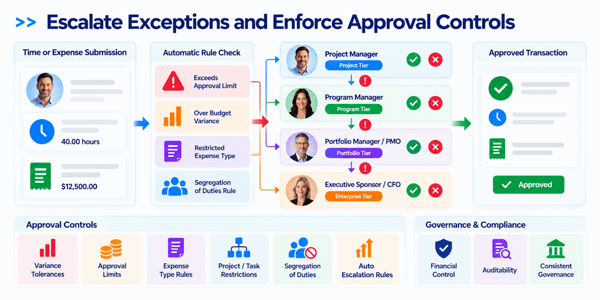
Escalate Exceptions and Enforce Approval Controls

Approval workflows should also define what happens when activity falls outside normal limits. Pacific Timesheet can support rules that route exceptions to the appropriate level rather than relying on managers to recognize and manually escalate every issue.

Organizations can establish controls around variance tolerances, approval limits, and segregation of duties. For example, an expense that exceeds a defined project threshold can be escalated to a higher-level approver, while policies can prevent employees or managers from approving their own transactions.

This helps organizations maintain consistent governance while supporting financial control, compliance, and auditability.

For the Product Tour, I especially like the progression of Hierarchy → Authority → Escalation. It makes the approval story much easier to understand than presenting the full four-level matrix all at once.
Escalate Exceptions and Enforce Approval Controls-2

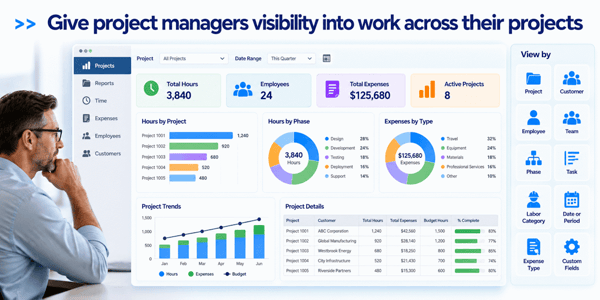
Give project managers visibility into work across their projects

Project managers should not have to wait for spreadsheets or accounting reports to understand where employees are spending their time.

Pacific Timesheet provides reporting and visibility into project activity captured through employee timesheets and expense records.

Managers can analyze information by dimensions such as:

    • Project
    • Customer
    • Employee
    • Team
    • Phase
    • Task
    • Labor category
    • Date or reporting period
    • Expense type
    • Other custom fields

This helps project managers answer everyday questions such as:

  1. How many hours have been charged to this project?

  2. Which employees are working on it?

  3. Where is the project consuming the most labor?

  4. How much time has been spent on a particular phase or task?

  5. Which projects have experienced increasing labor usage?

Having this information available from the same system employees use to enter their time reduces dependence on manually assembled project spreadsheets.

project-visibility-for-project-managers-2


Create project reports without rebuilding your data in spreadsheets

Project organizations often spend significant time exporting, combining, and restructuring time data before it becomes useful.

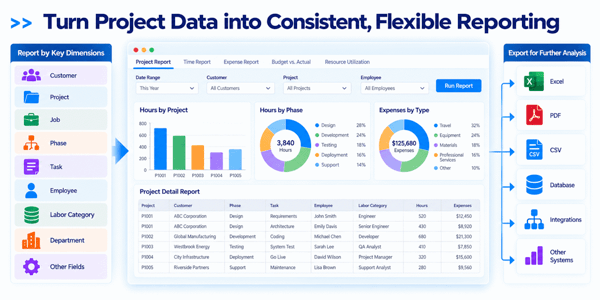
Pacific Timesheet provides configurable reporting that lets organizations use the project information already captured within the system. 

Turn Project Data into Consistent, Flexible Reporting

Reports can be organized around the dimensions important to your organization, including customers, projects, jobs, phases, tasks, employees, labor categories, departments, and other fields.

Project data can also be exported when additional analysis or downstream processing is required.

This gives managers access to consistent project information while reducing the need to repeatedly reconstruct the same data outside the system.


project-data-reporting-graphic-2


Connect project time and expense data with your business systems

Project time data rarely exists in isolation.

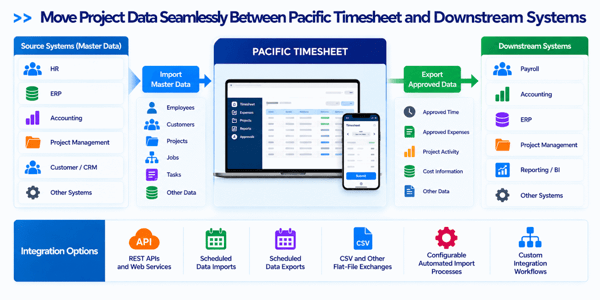
Pacific Timesheet can support integrations with the systems your organization uses for payroll, accounting, ERP, project management, HR, and other business processes.

Move Project Data Seamlessly Between Pacific Timesheet and Downstream Systems

Integration options can include:

  • REST APIs and web services

  • Scheduled data imports

  • Scheduled data exports

  • CSV and other flat-file exchanges

  • Configurable automated import processes

  • Custom integration workflows

Organizations can bring employee, customer, project, job, task, and other master data into Pacific Timesheet and send approved time and expense information to downstream systems.

This allows Pacific Timesheet to serve as the operational time-and-expense layer between employees performing project work and the financial or business systems that ultimately consume that information.

pacific timesheet data integration flow-2


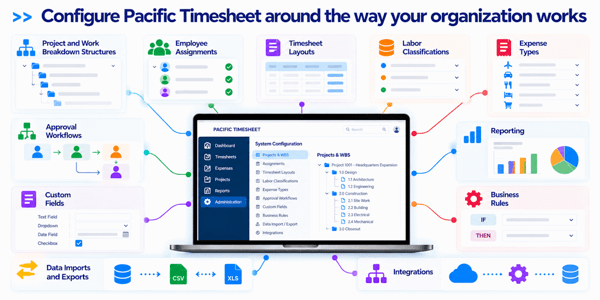
Configure the system around your project environment

Project organizations differ widely in how they define work, manage employees, approve time, calculate costs, and exchange information with other systems.

Pacific Timesheet is designed to accommodate those differences.

Configure Pacific Timesheet around the way your organization works

The system can be configured around your requirements for:

    • Project and work breakdown structures
    • Employee assignments
    • Timesheet layouts
    • Labor classifications
    • Expense types
    • Approval workflows
    • Custom fields
    • Reporting
    • Business rules
    • Data imports and exports
    • Integrations

This flexibility allows organizations to support straightforward project time tracking today while maintaining the ability to accommodate more complex requirements as their operations grow.

pacific timesheet configuration overview-2

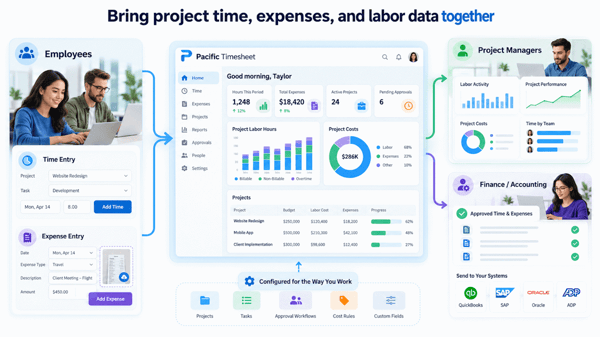
Bring project time, expenses, and labor data together

Pacific Timesheet gives project-based organizations a single system for capturing the work employees perform and turning that activity into useful project information.

Employees get straightforward time and expense entry.

Project managers get better visibility into labor activity, costs, and project performance.

Finance and accounting teams get structured, approved information that can flow into the systems they already use.

And your organization gets a project time and expense tracking platform that can be configured around the way you actually operate.

Connected Project Data Dashboard-2