Payroll Time and Expense Tracking Product Tour

 Explore how payroll teams use Pacific Timesheet to collect accurate time and expense data, enforce policies, and prepare payroll-ready records.

A guided walkthrough for payroll and HR teams 


Capture Employee Time

Give employees simple, flexible ways to record time wherever work gets done. Pacific Timesheet supports multiple time-entry methods so organizations can match time collection to different employee groups, work environments, and payroll requirements. 

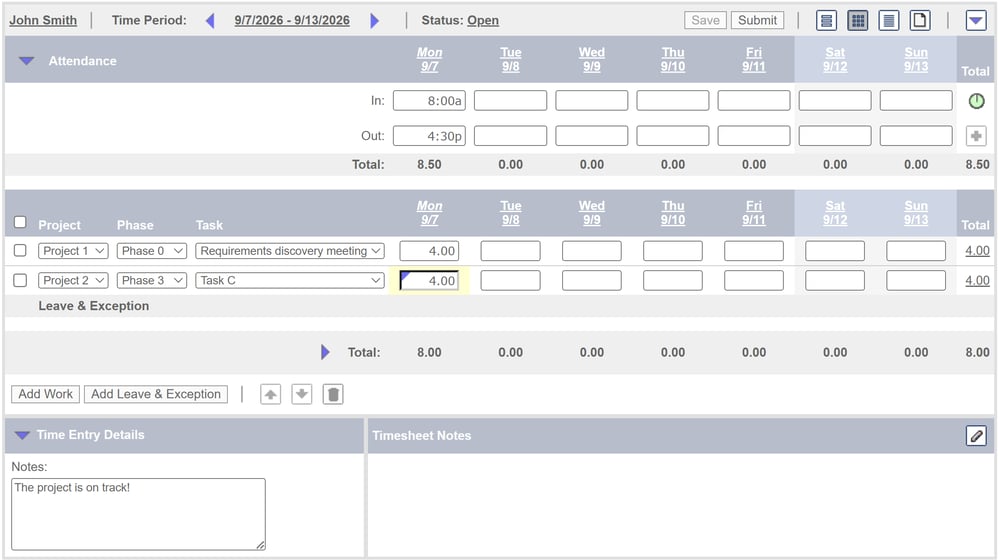
Web Timesheets

Employees can enter time through a browser using daily or weekly timesheets configured around the information payroll needs—including hours, pay codes, departments, jobs, projects, tasks, cost centers, and other dimensions. 

project-attendance-combination-timesheet

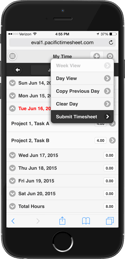
Mobile & Tablet Time Entry

Employees can enter time from phones and tablets, select appropriate work or pay classifications, add notes, and submit time for approval without returning to an office. 

phone-iphone6-mobile-app-1853-1771


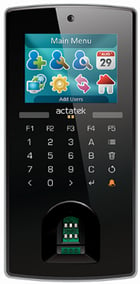
Kiosk & Time Clock Entry

For employees working at shared locations, Pacific Timesheet supports kiosk and biometric time-clock workflows for clocking in and out, providing centralized attendance capture without requiring an individual computer or mobile device. 

actatek-biometric-smartcard-time-clock

Additional Time Capture Capabilities

Configure additional time-entry options and controls to match the needs of different employee groups and payroll workflows.

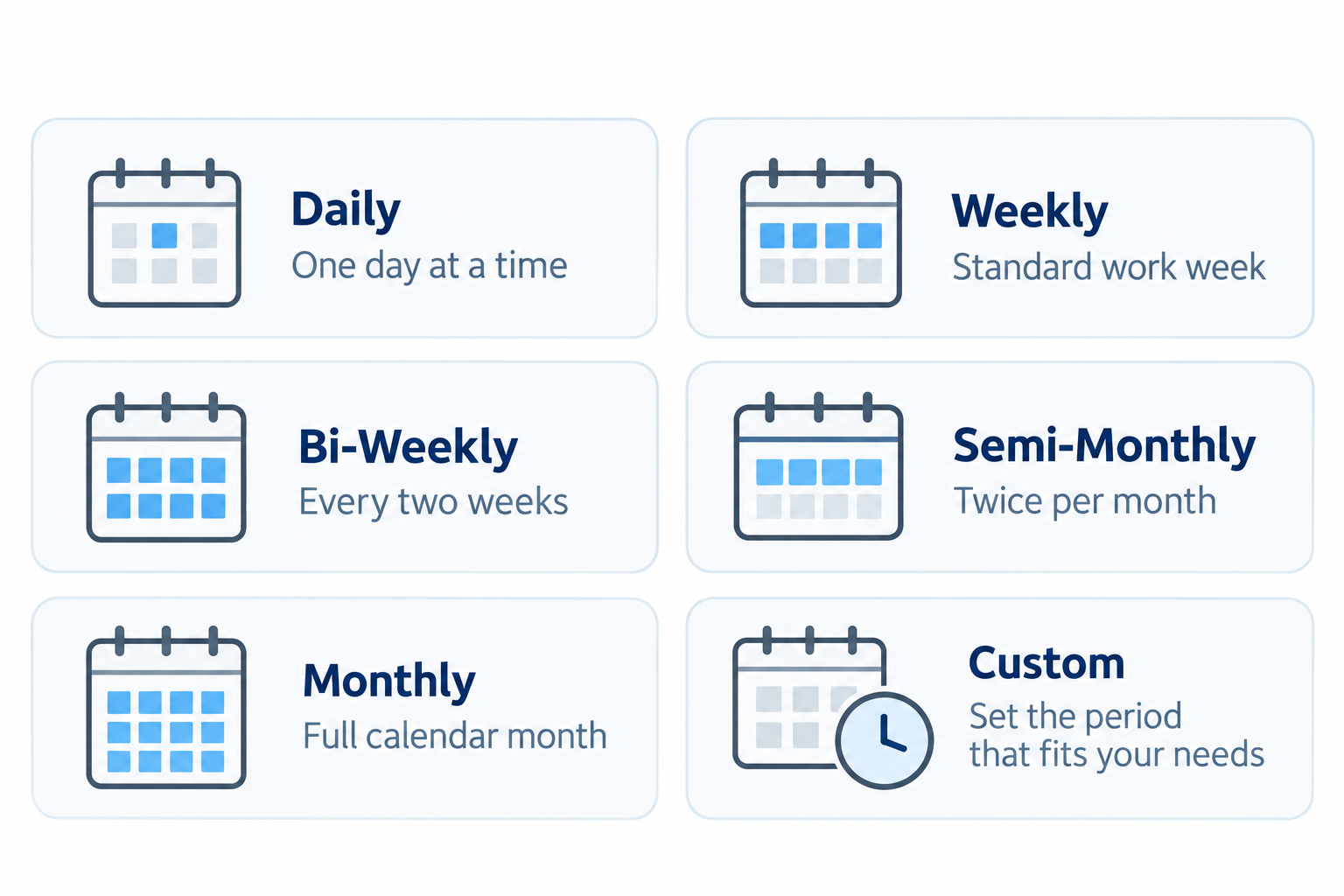
daily-weekly-time-periods-5

Daily & Weekly Timesheets

Support different reporting periods and employee workflows.
pacific_timesheet_time_capture_rounding_200kb-1

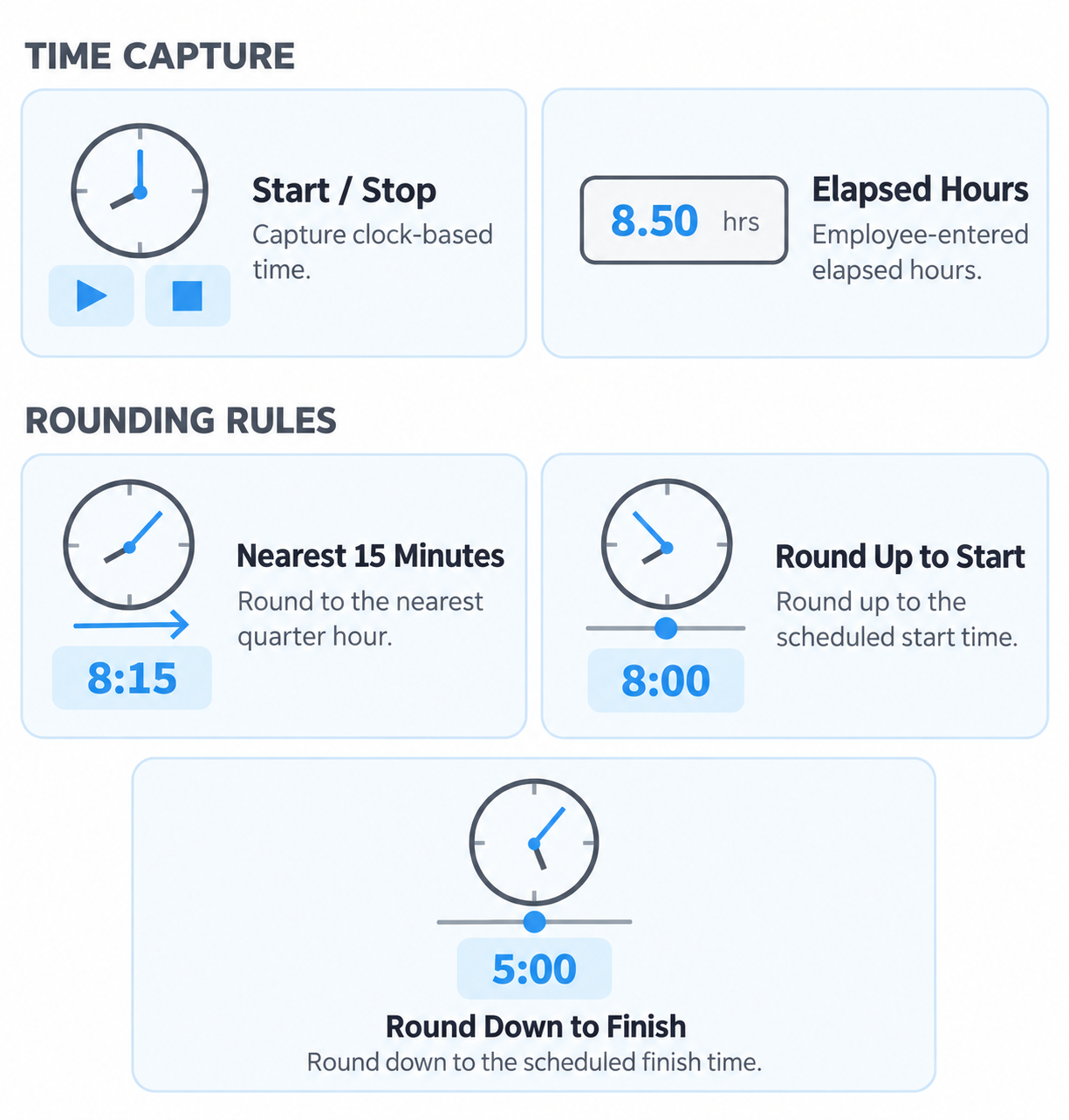
Start/Stop & Elapsed Time

Capture clock-based time or employee-entered elapsed hours.

attach-notes-documents-4

Notes & Attachments

Add supporting information and documentation to time entries.

inspect-corrections

Corrections & Validation

Identify missing/invalid information & manage corrections before payroll.
  

Track Attendance and Exceptions

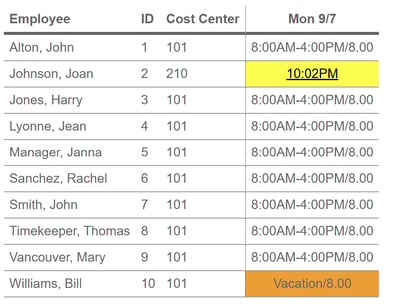
Turn clock and timesheet data into actionable attendance information.

Pacific Timesheet helps supervisors and payroll teams identify attendance problems without manually reviewing every employee record.

Identify Missing Punches and Incomplete Time

Pacific Timesheet can help identify missing clock punches, incomplete entries, and other gaps before payroll processing begins.

Instead of discovering missing information during payroll preparation, supervisors can resolve exceptions while the information is still current.

Missed-punch-attendance-dashboard

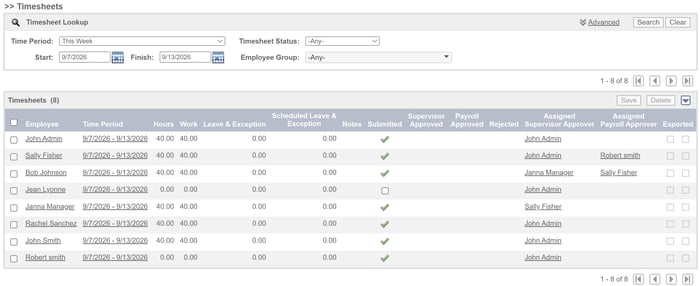
Monitor Unsubmitted Timesheets

Managers and payroll administrators can quickly identify employees who have not completed or submitted their timesheets.

This gives organizations a more systematic way to manage payroll deadlines.

monitor-missing-timesheets

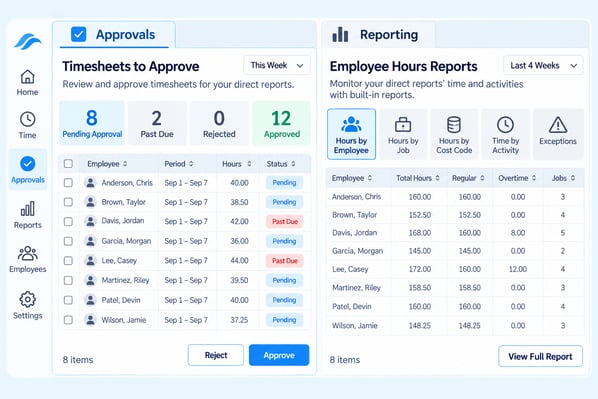
Supervisor Visibility

Supervisors can review employee time and attendance information for the people or organizational units they are responsible for.

This distributes responsibility for resolving errors instead of leaving payroll to investigate every exception.

supervisor-approvals-reporting-dashboards-1

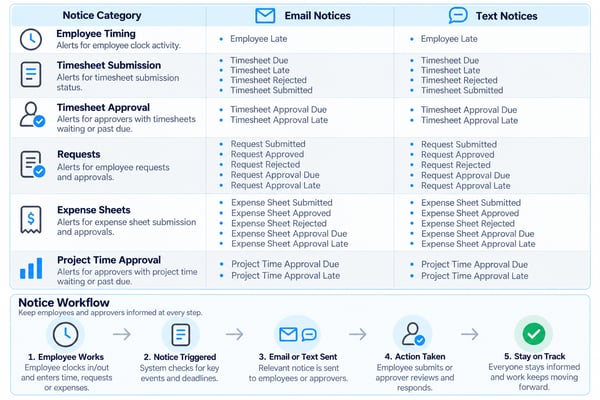
Notifications and Reminders

Automated notifications can remind employees and managers about missing time, timesheets awaiting submission, approval requirements, and other time-sensitive actions.

Email and text-based notices can help keep the payroll process moving without relying on manual follow-up.

notifications and reminders-3


Apply Pay Rules Automatically

Turn employee time into payroll-ready hours by applying your organization's pay rules before payroll processing.

Pacific Timesheet can automate many of the calculations that would otherwise require payroll staff to interpret raw employee time manually.

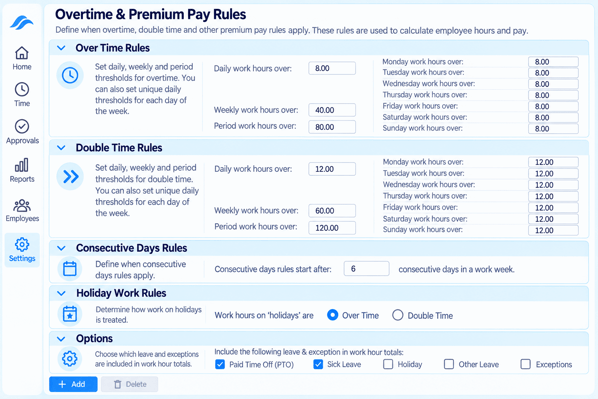
Regular, Overtime and Double-Time Calculations

Configurable rules can distinguish regular hours from overtime and double time based on organizational requirements.

Rules can support daily, weekly, or other defined overtime conditions depending on the policies that apply to an employee group. 

overtime-rules-4

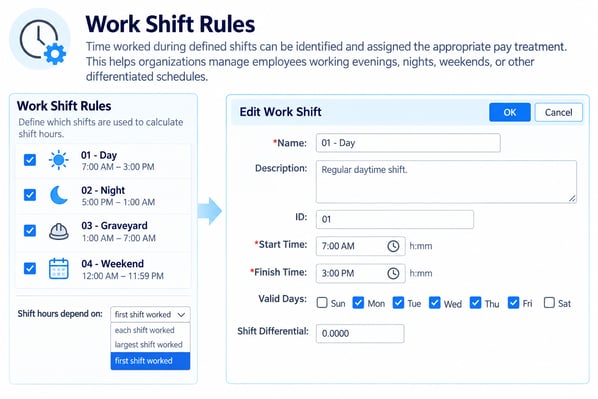
Shift Differentials

Time worked during defined shifts can be identified and assigned the appropriate pay treatment.

This helps organizations manage employees working evenings, nights, weekends, or other differentiated schedules.

work-shift-rules

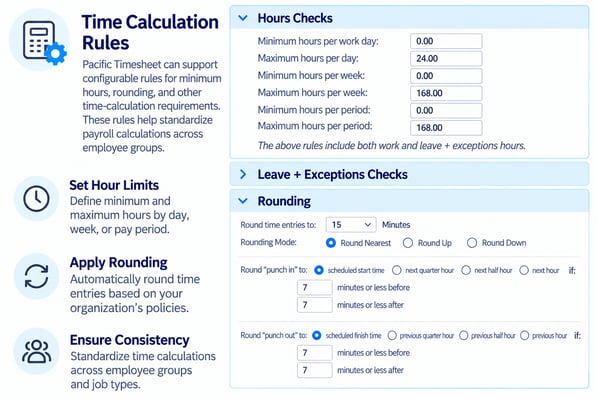
Minimum-Hour and Rounding Rules

Pacific Timesheet can support configurable rules for minimum hours, rounding, and other time-calculation requirements.

These rules help standardize payroll calculations across employee groups.

time-rules-calculations

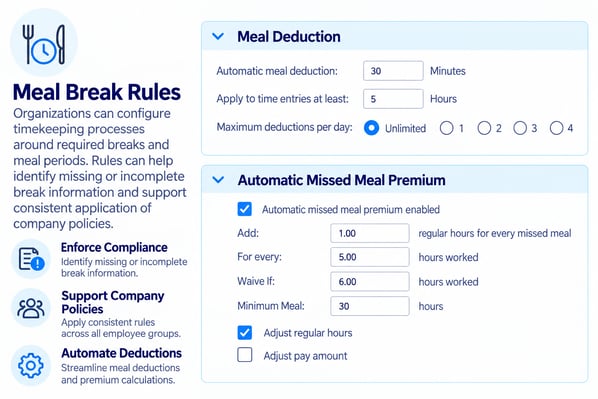
Break and Meal Rules

Organizations can configure timekeeping processes around required breaks and meal periods. Rules can help identify missing or incomplete break information and support consistent application of company policies.

meal-break-rules

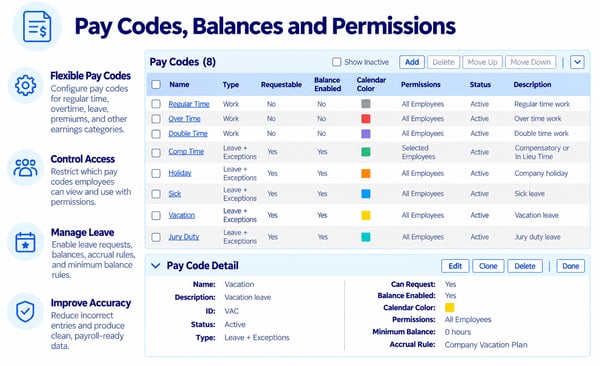
Flexible Pay Codes and Controls

Configure pay codes for regular time, overtime, leave, premiums, and other earnings. Control employee access with permissions, enable leave requests, manage  balances, accruals, and minimum balance rules to improve payroll accuracy.

pay-codes-balances-permissions-1


Manage Time Off and Leave

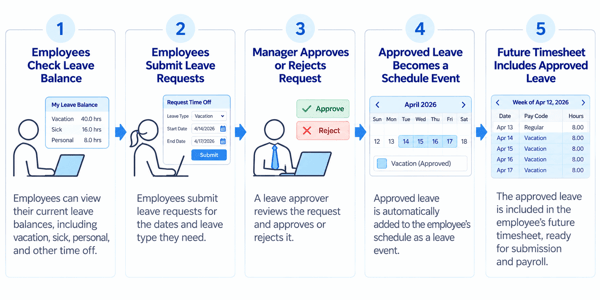
Manage employee leave alongside worked time so payroll has a complete record of each pay period. Pacific Timesheet can support leave requests, approvals, leave taken, balances and accruals. 

Leave Requests and Approvals 

Employees can submit leave requests through a controlled workflow.

Managers can review requests, approve or reject them, and maintain visibility into scheduled employee absences.

vacation-sick-personal leave workflow-2

Holiday Rules and Schedules

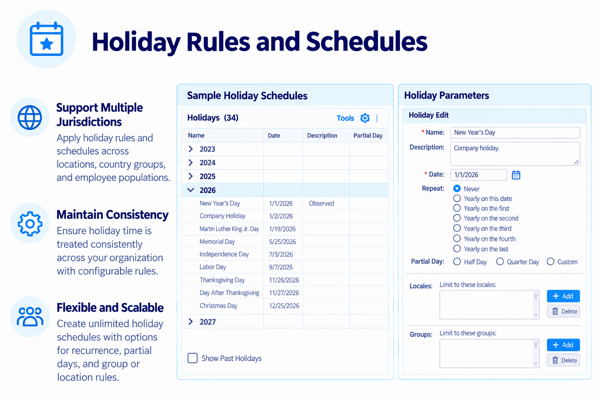
Unlimited holiday rules and schedules can be incorporated into the timekeeping process so holiday time is treated consistently across multiple jurisdictions and country groups.

holidays-schedules-rules

Leave Balances and Accruals

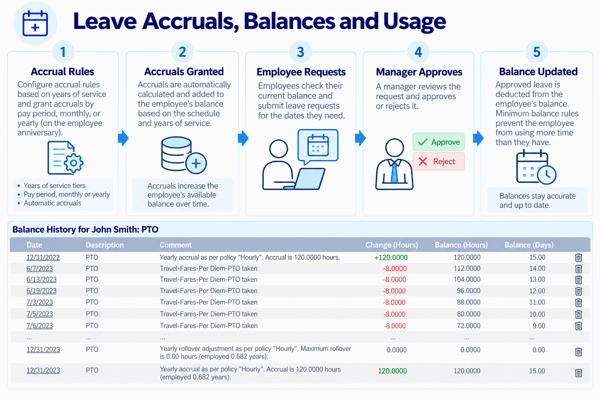
Where configured, employees and managers can view leave balances and track available time.

Accrual rules can help maintain current balances based on organizational leave policies. 

leave-accruals-balance-usage-1


Capture Employee Expenses

Collect employee expenses in the same workflow used to manage time.

Pacific Timesheet can help organizations capture reimbursable expenses, supporting documentation, and accounting classifications without relying on separate spreadsheets or paper forms.

Expense Tracking

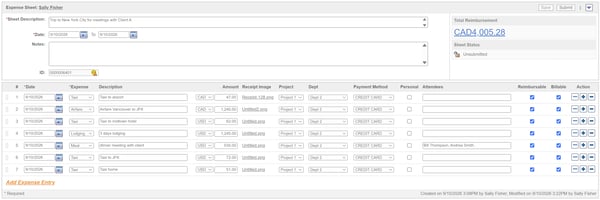
Employees can enter expense items in configurable expense reports.

editable-expense-sheet

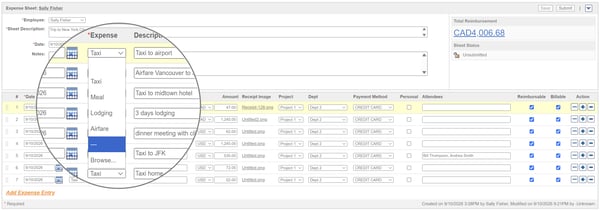
Lodging, Meals and Other Reimbursable Expenses

Expense categories can include lodging, meals, transportation, materials, equipment, and other organization-defined expenses.

expense-items-list

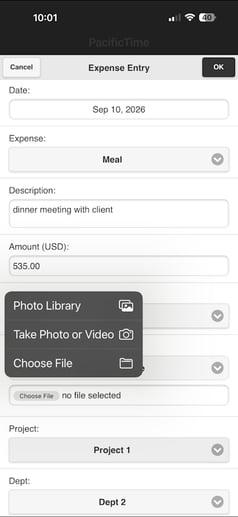
Receipts and Supporting Documentation

Employees can provide supporting information and attach receipts and other documentation where required.

This gives managers and finance teams better information during expense review.

pacific-time-app-expense-item-receipt

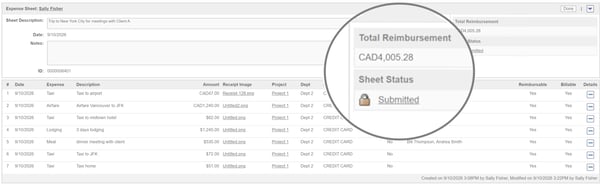
Multicurrency 

Expenses can recorded in local currencies and translated into an employee's reimbursement currency.  

expense-sheet-total-reimbursement

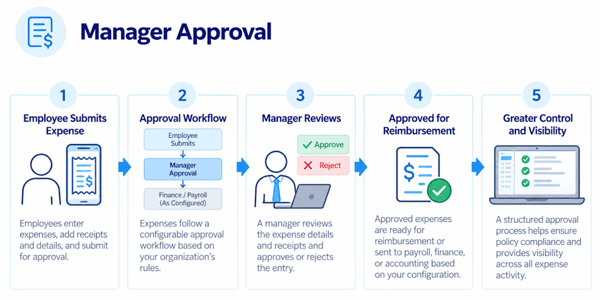
Manager Approval

Expense entries can follow configurable approval workflows before reimbursement or downstream processing.

This creates a more controlled process for validating expenses before they reach payroll, finance, or accounting. 

expense-report-workflow


Review and Approve Time and Expenses

Move employee time and expense information through a structured approval process before payroll.
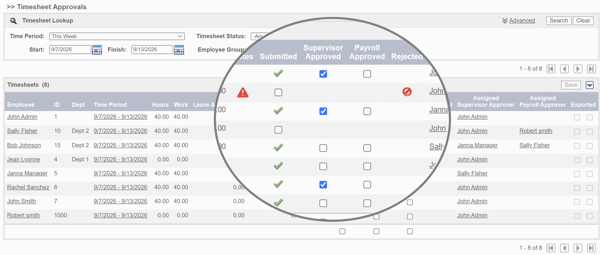
Pacific Timesheet gives organizations control over who reviews information, which approvals are required, and how exceptions are handled. 

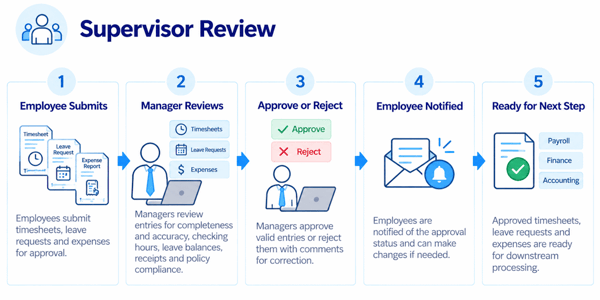
Supervisor Approvals Workflow

Managers can review employee timesheets, leave requests and expenses for completeness and accuracy before approving them. 

supervisor-review

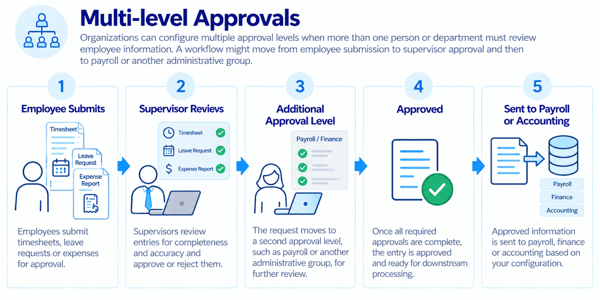
Multi-level Approvals

Organizations can configure multiple approval levels when more than one person or department must review employee information.

A workflow might move from employee submission to supervisor approval and then to payroll or another administrative group. 

multi-level-approvals

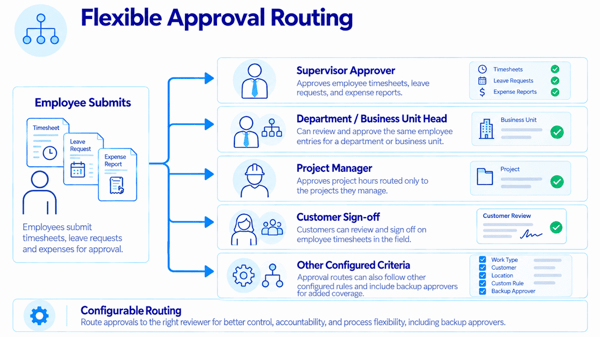
Approval Routing Options

Approval workflows can be designed around organizational responsibilities.

Approvals may be routed to supervisors, department or business unit heads, project managers, customer, cost center manager, or other configured criteria. Every approval level can have a backup approver. 

flexible-approval-routing

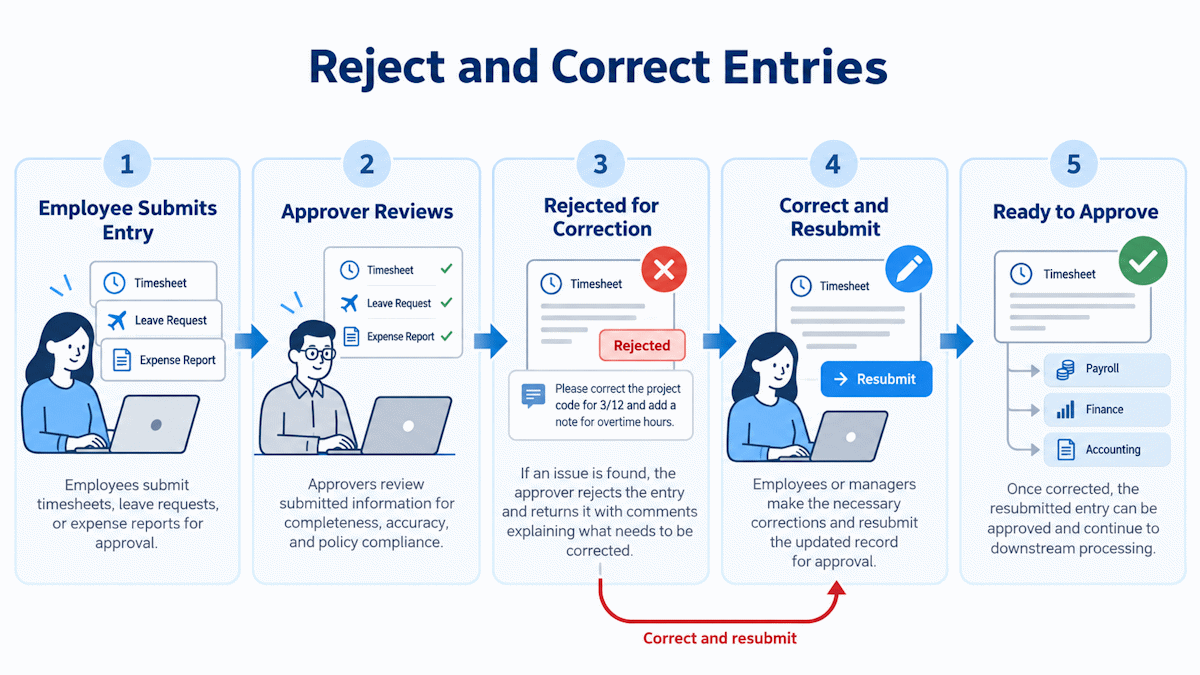
Reject and Correct Entries

Approvers can return information that requires correction instead of allowing inaccurate data to move downstream.

Employees or managers can then make the necessary changes and resubmit the record.

rejections-corrections

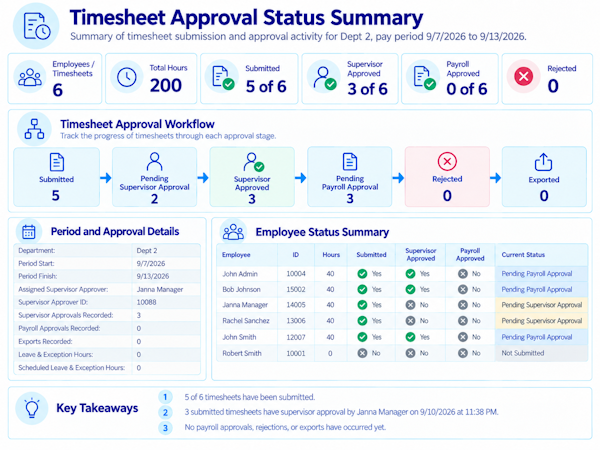
Track Approval Status

Payroll and administrators can see which timesheets and expenses have been submitted, approved, rejected, or are still awaiting action.

That visibility makes it easier to manage deadlines and identify bottlenecks before payroll processing.

track-approval-status


Resolve Payroll Exceptions Before Processing

Find problems before they become payroll problems.

Pacific Timesheet helps payroll teams identify incomplete, unusual, or unresolved records before payroll data is exported.

Unsubmitted Timesheets/ Unapproved Timesheets

See which employees have not submitted their time for the current payroll period.

Identify submitted timesheets that are still awaiting supervisor or administrative approval. 

timesheet-approval-status-summary-2

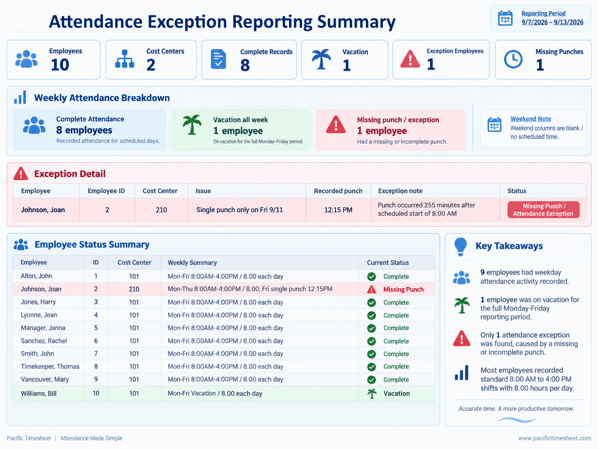
Missing Punches

Find incomplete clock records that require correction before hours are calculated.

Attendance-exception-report-2

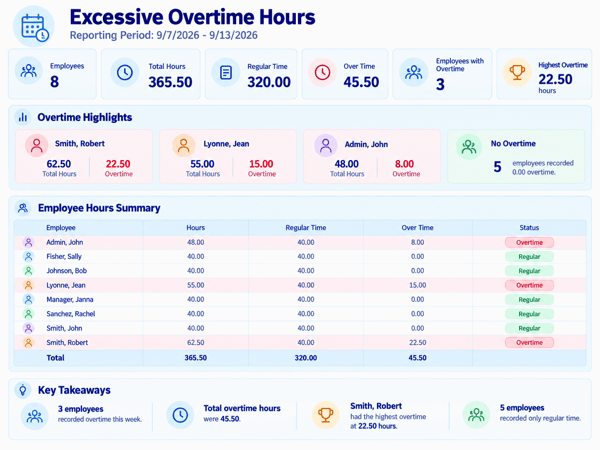
Unexpected Overtime

Review overtime and other unusual hour patterns before they are included in payroll. 
excessive-overtime-summary-2

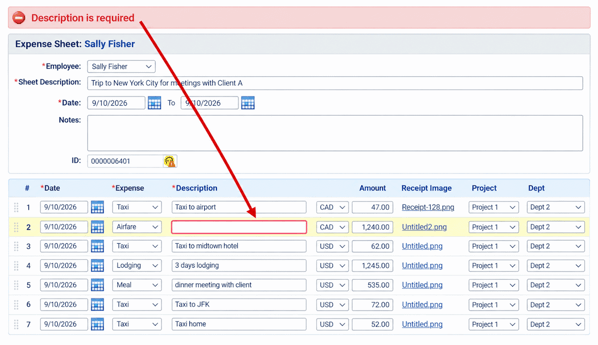
Incomplete Expenses

Identify expense reports or entries that are missing required information, approvals, or documentation.

By resolving these issues before export, payroll teams can reduce last-minute research, adjustments, and corrections.

expense-description-required-error-message-2


Export Payroll-Ready Data

Move approved and validated time and expense information into payroll and other downstream systems.

Pacific Timesheet can act as the collection, validation, and approval layer between employees and payroll.
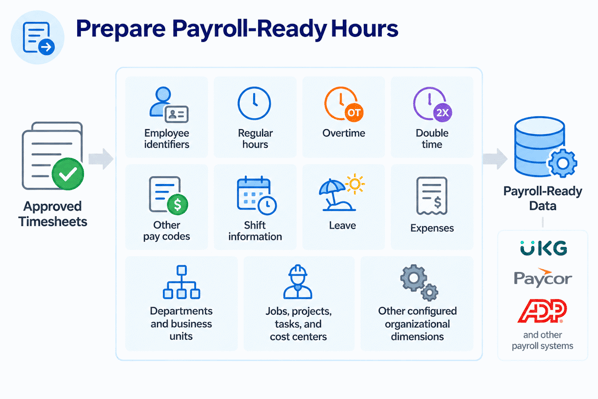
Prepare Payroll-Ready Hours

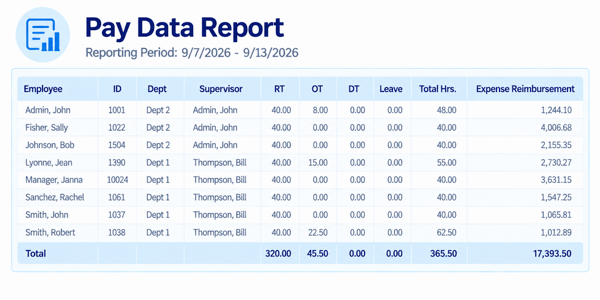
Approved records can include the employee and payroll information required by downstream systems, such as:

  • Employee identifiers
  • Regular hours
  • Overtime
  • Double time
  • Other pay codes
  • Shift information
  • Leave
  • Expenses
  • Departments and business units
  • Jobs, projects, tasks, and cost centers
  • Other configured organizational dimensions


Preparing Payroll-Ready Hours-2

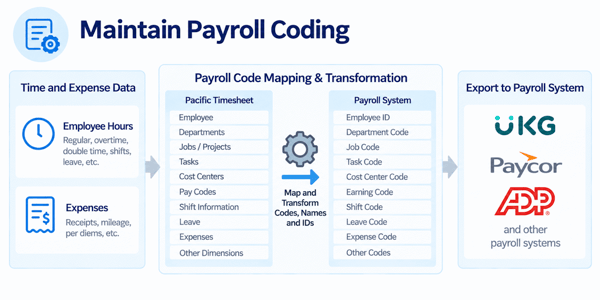
Payroll Data Workflow

Pacific Timesheet can track hours and expenses before export to match downstream payroll systems codes required for payroll processing, reporting, costing, or accounting. Where payroll system naming conventions differ from time keeping and expense tracking best practices, Pacific Timesheet can transform names and IDs upon export, eliminating the need to manually edit data after collection. 

payroll-coding-transformation-workflow-2

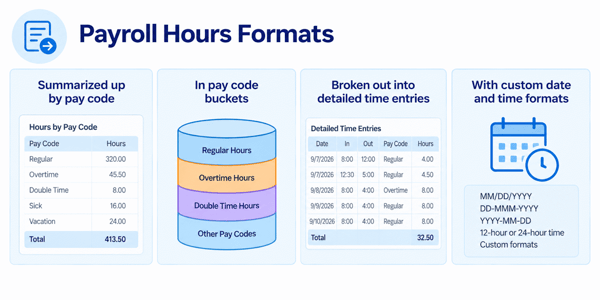
Payroll Hours Formats

Exported hours data can be sent in a variety of formats:

  • Summarized up by pay code
  • In pay code buckets
  • Broken out into detailed time entries
  • With custom date and time formats

payroll-hours-formats-2


Reporting and Payroll Visibility

Give payroll, finance, and managers better visibility into workforce time and expense data.

Pacific Timesheet reporting can help organizations analyze information across the dimensions used to manage their workforce.

Employee and Supervisor Reporting

Review time and expense information by employee, supervisor, or employee group.

pay-data-report-2

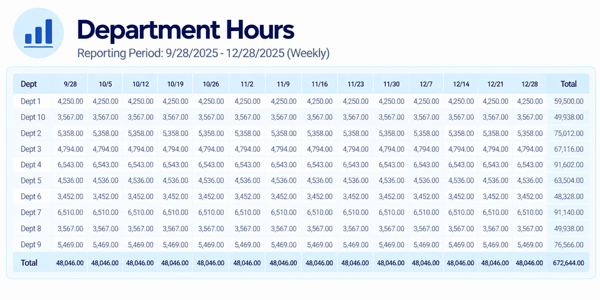
Department, Location and Business Unit

Analyze workforce information according to organizational structure.

department-hours-weekly-report-2

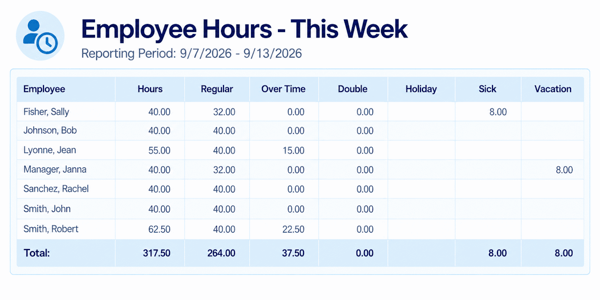
Pay and Leave Reporting

Review regular time, overtime, other pay classifications, leave types, and related payroll information.

employee-hours-by-pay-code-2

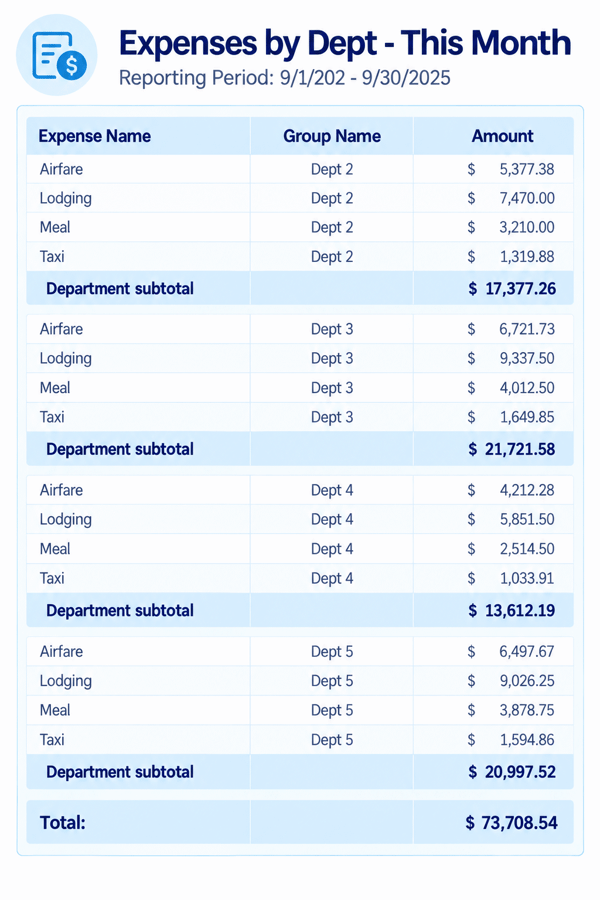
Expense Reporting

Analyze employee expenses by category, employee, department, project, or other configured dimension.

expenses-by dept - this month-2

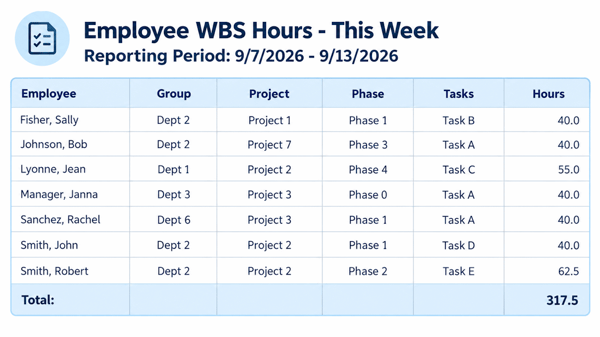
Job, Project and Cost Reporting

Organizations that track labor against work can report by project, job, task, cost center, customer, or other work breakdown structures. 

employee-hours-by-WBS-this-week-2

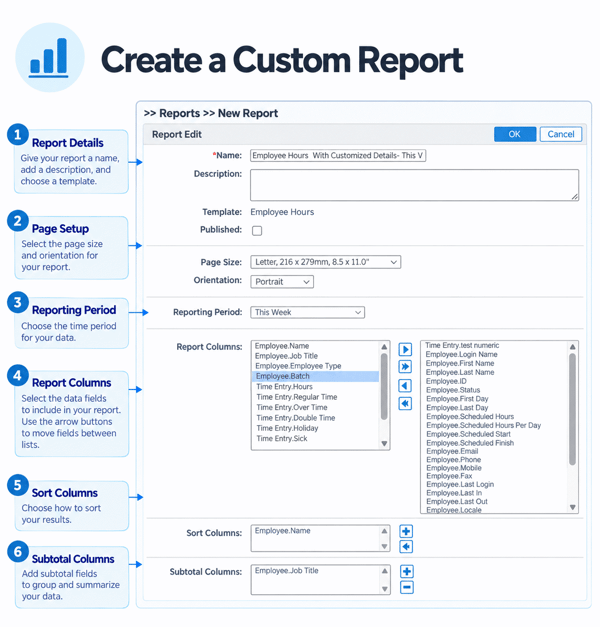
Custom Reporting Dimensions

Custom fields and organizational dimensions can provide additional ways to categorize and report on employee information.

The result is greater visibility into the information that drives payroll and workforce costs.

create-custom-report-2


Configure Pacific Timesheet Around Your Organization

Adapt time and expense tracking to the structure, policies, and workflows of your organization.

Pacific Timesheet is designed to support organizations whose requirements go beyond a single standard timesheet. 

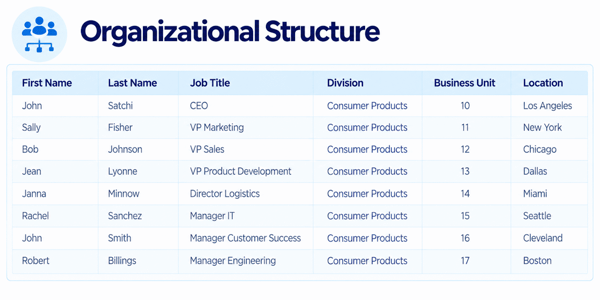
Organizational Hierarchy

Configure employees within departments, divisions, locations, business units, or other organizational structures.

organizational-structure-2

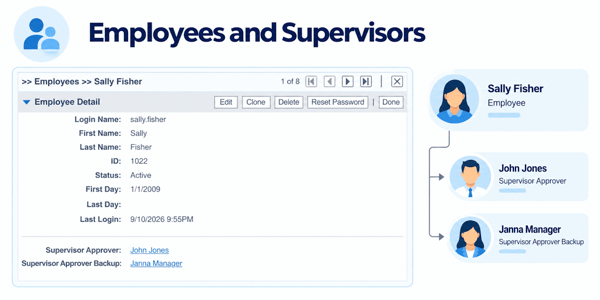
Employees and Supervisors

Define employee relationships and management responsibilities so users see and approve the appropriate information. Pacific Timesheet provides up to four supervisory approval levels, with backup approvers at each level.
employees-supervisors-2

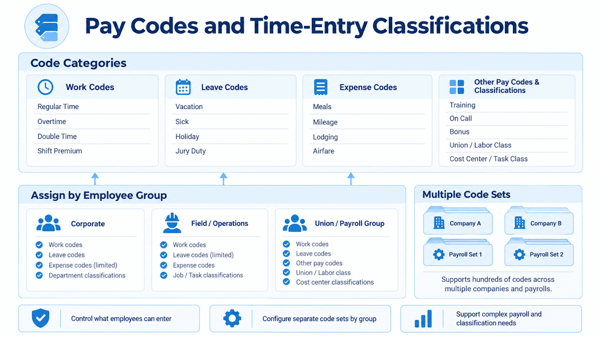
Pay Codes and Time-Entry Classifications

Configure work, leave, expense, other pay codes and time classifications required for different groups of employees. Support for hundreds of codes for different companies and payrolls in multiple sets.  
pay-codes-time-entry-classications-2

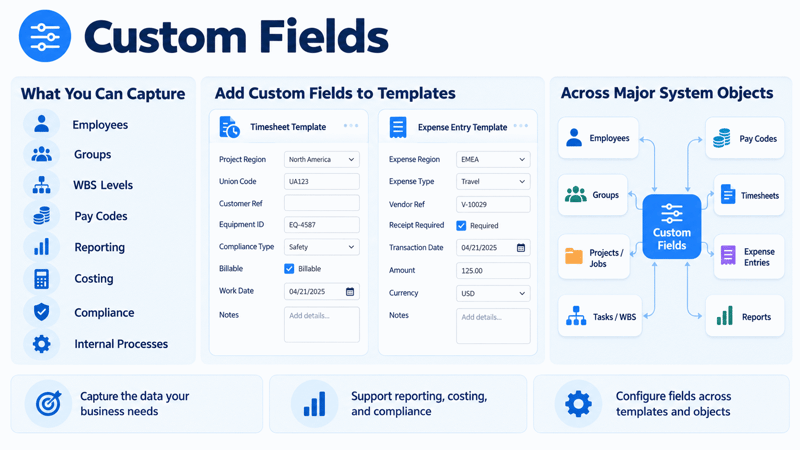
Custom Fields Options

Capture additional information required for employees, groups, WBS levels, pay codes, reporting, costing, compliance, or internal processes. Custom fields can be added to timesheet templates, expense entry templates and all major objects in the system.

custom-fields-2

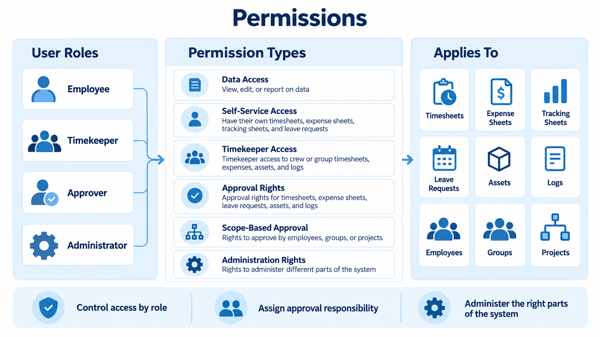
System Permissions

Pacific Timesheet's robust permissions model allows customized control over how different users can:

  • View, edit or report on data.
  • Have their own timesheets, expense sheets, tracking sheets, and leave requests.
  • Having timekeeper access to crew or group timesheets, expenses, assets and logs.
  • Having approval rights to timesheets, expense sheets, leave requests, assets and logs.
  • Rights to approve employees, groups or projects
  • Rights to administering different parts of the system.

permissions-2

Flexible Configuration

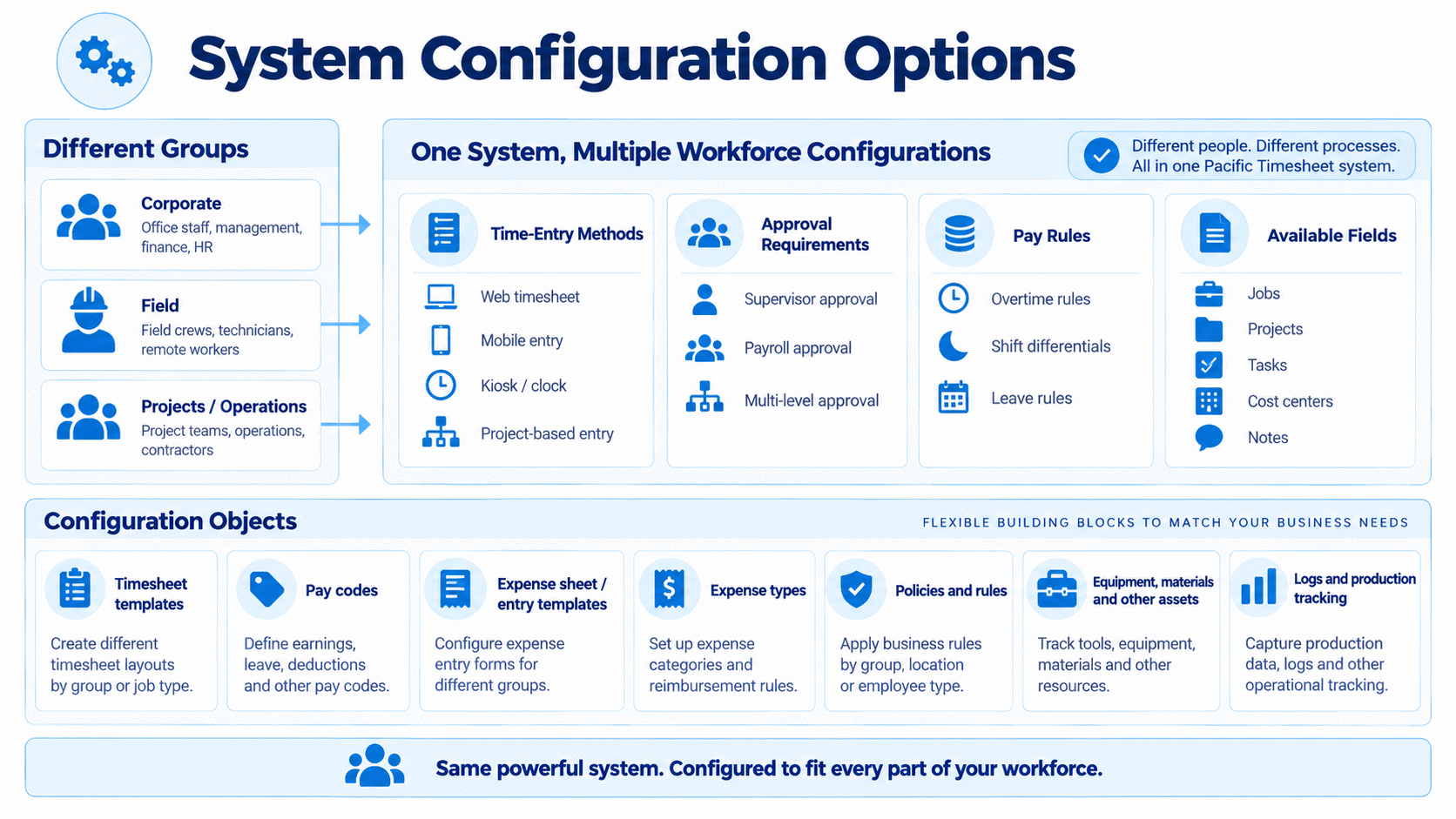
Different parts of the organization and employee populations can be given different time-entry methods, approval requirements, pay rules, and available fields.

This allows one system to support multiple workforce requirements without forcing every employee into the same process.

These include:

  • Timesheet templates
  • Pay codes
  • Expense sheet/entry templates
  • Expense types
  • Policies and rules
  • Equipment, materials and other assets
  • Logs and production tracking
system-configuration-options-2


Security, Control and Auditability

Maintain greater control over workforce time and expense records.

Pacific Timesheet provides administrative controls designed to help organizations manage who can access information, who can approve it, and how changes are handled. 

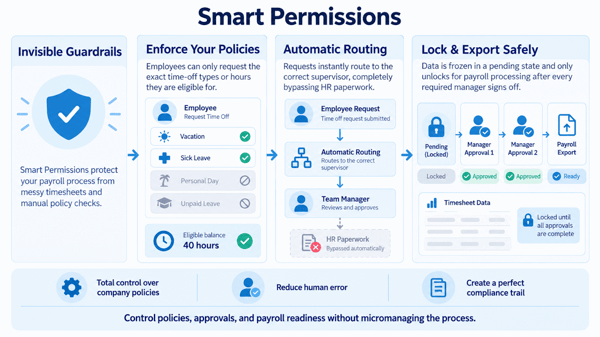
Smart Permissions

Tired of messy timesheets and manual policy checks? Our Smart Permissions framework acts as an invisible guardrail for your payroll process.

  • Enforce Your Policies: Employees can only request the exact time-off types or hours they are eligible for.
  • Automatic Routing: Requests instantly route to the correct supervisor, completely bypassing HR paperwork.
  • Lock & Export Safely: Data is frozen in a pending state and only unlocks for payroll processing after every required manager signs off.

You get total control over company policies, zero human error, and a perfect compliance trail—without having to micromanage a thing.


smart-permissions-2

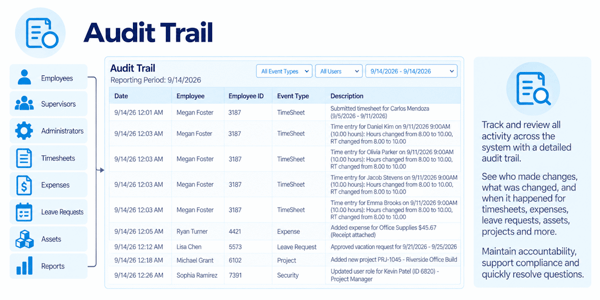
Change History and Auditability

Controlled changes and historical information can help organizations understand how records were updated during the timekeeping and approval process.

audit-trail-2

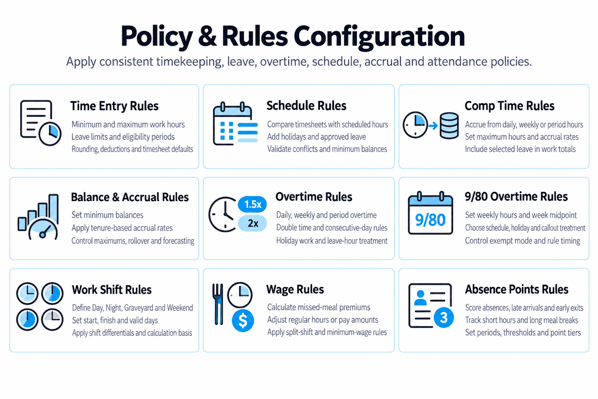
Consistent Policies and Rules Enforcement

Configured policies and rules help organizations apply timekeeping and payroll policies consistently instead of relying on individual interpretation. 

policy-rules-configuration-2

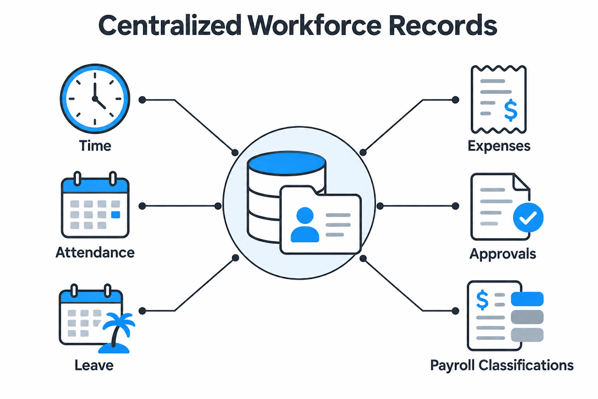
Centralized Workforce Records

Time, attendance, leave, expenses, approvals, and payroll classifications can be managed within a centralized system, giving payroll and management a more complete record of workforce activity. 

centralized-workforce-records-2

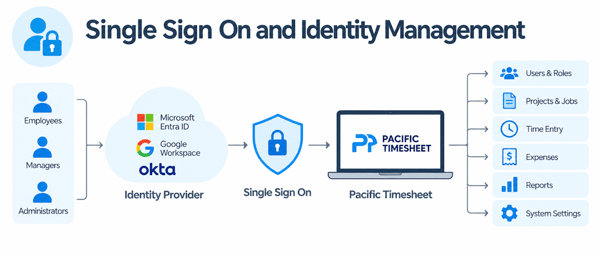
Single Sign On - Identity Management

Use SSO and identity management to grant users access to Pacific Timesheet and various system objects and other security-based activities. 

single-sign-on-identity-management-2


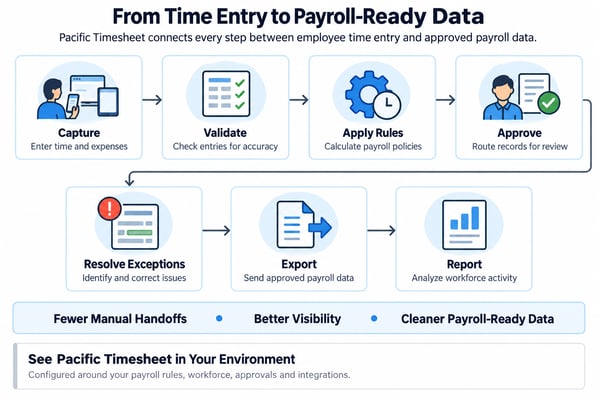
From Employee Time to Payroll-Ready Data

Pacific Timesheet connects the steps that happen between an employee recording time and payroll receiving approved data.

Capture → Validate → Apply Rules → Approve → Resolve Exceptions → Export → Report

Employees enter time and expenses using the method appropriate for their work environment. Pacific Timesheet validates the information, applies configured payroll rules, routes records for approval, identifies unresolved exceptions, and prepares approved information for payroll and other downstream systems.

The result is a more controlled workflow with fewer manual handoffs, better visibility, and cleaner payroll-ready data.

See Pacific Timesheet in Your Environment

Every organization has different payroll rules, workforce structures, approval requirements, and integration needs.

See how Pacific Timesheet can be configured around yours. 

from-time-entry-to-payroll-ready-data

Ready to see what's possible?

Take the Next Step

Explore Pacific Timesheet with a personalized demo, try it free or talk to our team.

Schedule a Demo

See Pacific Timesheet solutions in action with your team.

Start Free Trial

Try a fully-featured trial for 14 days. No credit card required.


Contact Sales

Get answers and a personalized evaluation from our experts.